
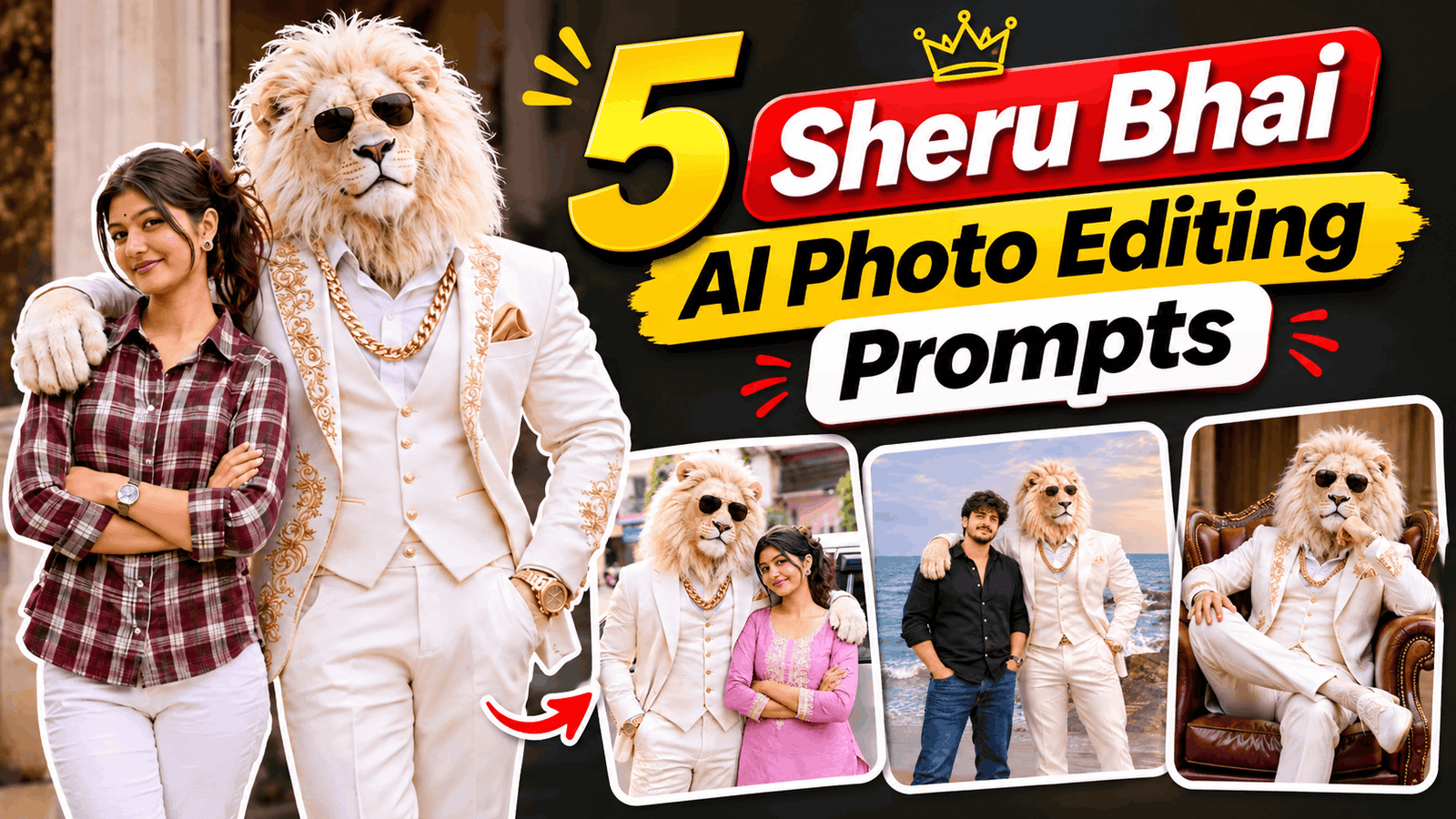
Sheru Bhai AI Photo Editing Prompts for Gemini: These 5 prompts put you next to Sheru Bhai, the royal white lion in a white suit and golden chain, in a palace entrance, while keeping your face the same.
Hello, my name is Sushil. I test these prompts myself before publishing them. Sheru Bhai is growing fast on Instagram reels right now. Everyone wants one photo standing next to him, and that is exactly what these prompts do. You upload your own photo, Gemini keeps your face the same, and Sheru Bhai stands beside you like a royal friend. The first two prompts are the original ones, one for a man and one for a woman, and the next three are made in the same style: a couple photo, a DP close-up and a night durbar photo.
Sheru Bhai at a Glance
The Lion: Majestic white lion, thick cream-white mane, premium white royal suit, heavy golden chain, golden wristwatch, golden pocket square
Outfits: Maroon, white and black checked shirt, white slim-fit trousers, silver wristwatch, golden ear stud, red round tilak, bare neck
Places: Luxurious palace entrance, cream pillars, green plants, royal durbar at night
Lens & Light: 85mm f/1.8, vertical 4:5, warm daylight, golden night lights
Quick Workflow
Step 1: Copy the Prompt: Pick the prompt that matches your photo and copy the full text.
Step 2: Upload Your Photo to Gemini: Open Gemini and upload the photo you want to edit.
Step 3: Paste the Identity Line First: Paste this line before the prompt, so Gemini keeps your face the same.
Step 4: Paste the Prompt and Generate: Paste the prompt after the identity line and generate.
Step 5: Regenerate If Needed: If the first result is wrong, change one line and try again.
Which Sheru Bhai Photo Do You Want?
- Man standing with Sheru Bhai: Prompt 1.
- Woman standing with Sheru Bhai: Prompt 2.
- Couple with Sheru Bhai: Prompt 3.
- DP or profile photo with Sheru Bhai: Prompt 4.
- Night royal photo with Sheru Bhai: Prompt 5.
Prompt 1: Standing with Sheru Bhai
A stylish young man standing next to Sheru Bhai at a palace entrance. The lion’s paw rests on the man’s shoulder. Best for the main Instagram post and a reel cover.
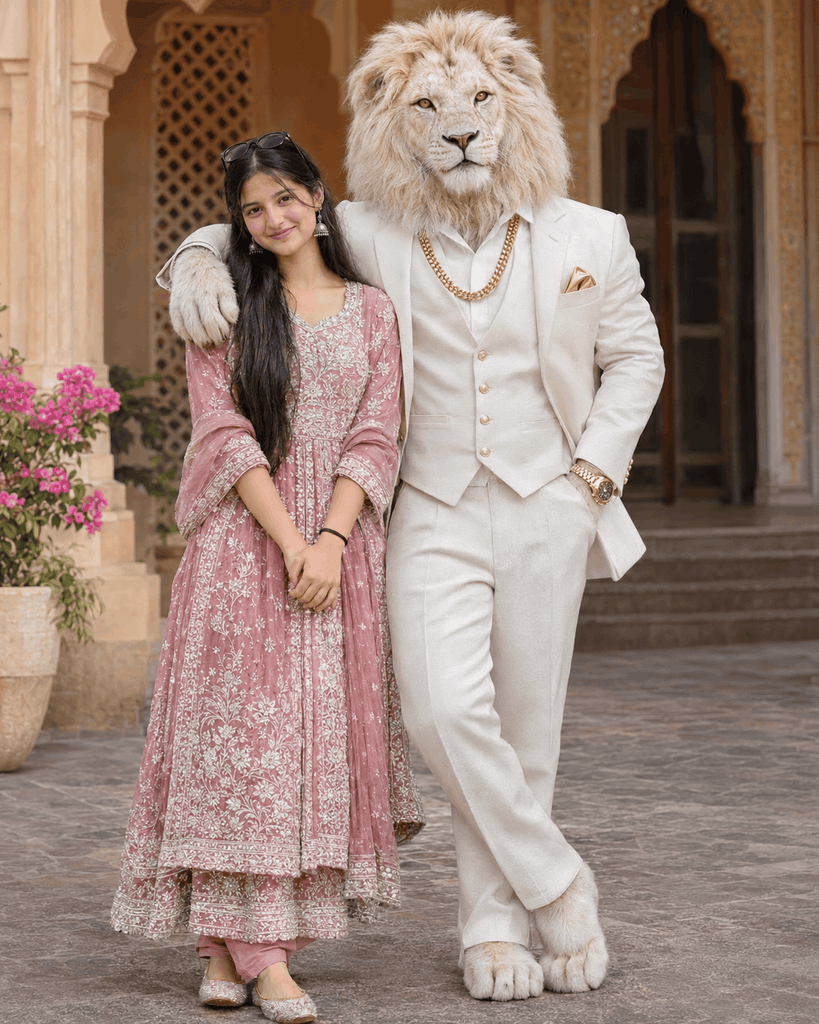
Use my uploaded photo as the PRIMARY and EXACT facial identity reference for the young Indian woman. Preserve her original face, face shape, skin tone, hairstyle, hairline, eyes, eyebrows, nose, lips, teeth, natural smile and body proportions. Do not change, beautify, reshape or replace her identity.

Create an ultra-realistic professional DSLR full-body portrait in vertical 4:5 ratio, inspired by the provided reference composition.

MAIN SUBJECT & POSE:

A beautiful young Indian woman standing beside a majestic anthropomorphic white lion (Sheru Bhai). The lion stands on her LEFT side, slightly taller than her, wearing an elegant white royal suit. His left arm is naturally placed around the woman's shoulders, with his large furry paw resting gently on her far shoulder. The woman stands comfortably beside him, smiling naturally at the camera. Both face the camera directly.

WOMAN'S OUTFIT:\
– Elegant dusty pink traditional Indian Anarkali suit.\
– Beautiful intricate white and silver floral embroidery on the front.\
– Matching pink embroidered dupatta draped gracefully over both arms.\
– Matching traditional bottom.\
– Elegant traditional footwear.\
– Small delicate earrings.\
– Preserve her original hairstyle exactly as in the uploaded photo.\
– Natural minimal makeup.\
– Keep her original facial identity unchanged.

SHERU BHAI – WHITE LION:\
– Majestic, highly realistic anthropomorphic white lion.\
– Thick, fluffy cream-white mane.\
– Beautiful realistic golden-brown eyes and natural lion facial anatomy.\
– Wearing a premium white three-piece royal suit.\
– White shirt and white waistcoat.\
– Heavy luxurious golden chain around his neck.\
– Elegant golden wristwatch.\
– Golden pocket square.\
– One arm comfortably wrapped around the woman's shoulders.\
– Natural furry lion paws with anatomically correct proportions.\
– Friendly, confident and protective royal expression.

BACKGROUND:

Beautiful traditional Indian palace entrance with warm yellow-orange sandstone architecture, decorative lattice windows, elegant pillars and natural outdoor daylight. Soft background blur while keeping both subjects perfectly sharp.

PHOTOGRAPHY STYLE:

Ultra-realistic professional DSLR photography, 85mm portrait lens, natural daylight, realistic skin texture, highly detailed lion fur, accurate anatomy, natural shadows, balanced exposure, premium Instagram photography, sharp facial details, cinematic color grading, 8K quality.

STRICT IDENTITY LOCK:\
The woman must look exactly like the person in the uploaded photograph. Do not generate a different face. Preserve her original facial proportions, skin tone and hairstyle.

NEGATIVE PROMPT:

Different face, altered facial features, altered identity, extra arms, extra fingers, distorted hands, human face on lion, cartoon lion, artificial fur, floating paw, incorrect shoulder placement, unrealistic body proportions, blurry faces, excessive makeup, text, Instagram interface, logos, watermarks.

FINAL OUTPUT: Ultra-realistic full-body portrait of the same woman standing beside Sheru Bhai, a majestic white lion in a royal white suit, with his arm around her shoulders. Vertical 4:5 ratio.Lion Check: The lion must look real, not like a statue, and its paw must sit naturally on your shoulder. If the paw looks stiff, ask for the paw resting gently and naturally.
Best For: Instagram post, reel cover, WhatsApp status and a stylish DP.
Also read: 7 Best Gemini Prompts for Men Professional 2026
Prompt 2: Standing with Sheru Bhai
A stylish young woman standing next to Sheru Bhai at a palace entrance. The lion’s paw rests on her shoulder. Best for the main Instagram post and a reel cover.
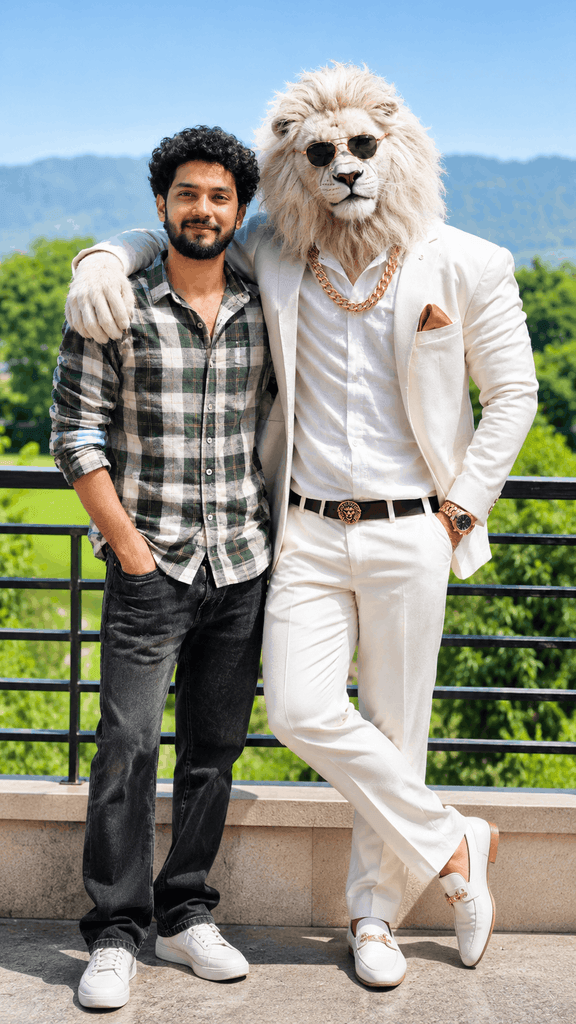
Create an ultra-realistic cinematic photo of me standing beside a majestic white lion-headed humanoid character wearing a premium white formal suit, white shirt, heavy golden chain, golden wristwatch and sunglasses. The lion has a realistic white furry face and a royal personality. The lion's arm is placed naturally around my shoulder like we are best friends.

I am wearing a green and white checkered shirt with black jeans, smiling naturally at the camera.

Cinematic depth of field, professional DSLR photography, natural lighting, ultra HD 8K quality.

Preserve my original face, facial features and identity 100%. Make it look like a real photograph, not AI-generated.Lion Check: The lion’s paw must rest gently on your shoulder, and the lion’s eyes must look natural. If the eyes look hard, ask for soft realistic eyes.
Best For: Instagram post, reel cover, WhatsApp status and a stylish DP.
Prompt 3: Boy with Sheru Bhai
A couple standing with Sheru Bhai between them at a palace entrance. The lion’s paws rest on both shoulders. Best for a couple post and a reel cover.

Use my uploaded photo as the exact facial identity reference. Keep my original face, hairstyle, skin tone and body proportions unchanged.

Add a majestic anthropomorphic white lion-headed humanoid character (Sheru Bhai) standing right beside me, just like a royal best friend. He should be significantly taller than me, wearing a premium white formal three-piece suit, white shirt, heavy golden chain, golden wristwatch and stylish sunglasses. His realistic fluffy cream-white lion mane and face should look highly detailed. One furry arm should rest naturally around my shoulder.

Keep my original outfit, pose, background, location, lighting, camera angle and composition exactly the same as the reference photo. Only add Sheru Bhai beside me, matching the original scene naturally.

Ultra-realistic professional DSLR photography, natural shadows, realistic proportions, 8K quality. No text, no watermark. 9:16 sizeLion Check: Both paws must rest naturally, one on each shoulder, and both faces must stay yours. If one face changes, regenerate with that person’s identity line first.
Best For: Couple post, anniversary post, reel cover and a shared DP.
Prompt 4: Sheru Bhai Best Look Photo
A tight close-up of you beside Sheru Bhai. Your face and the lion’s face share the frame. Best for a DP and a profile photo.
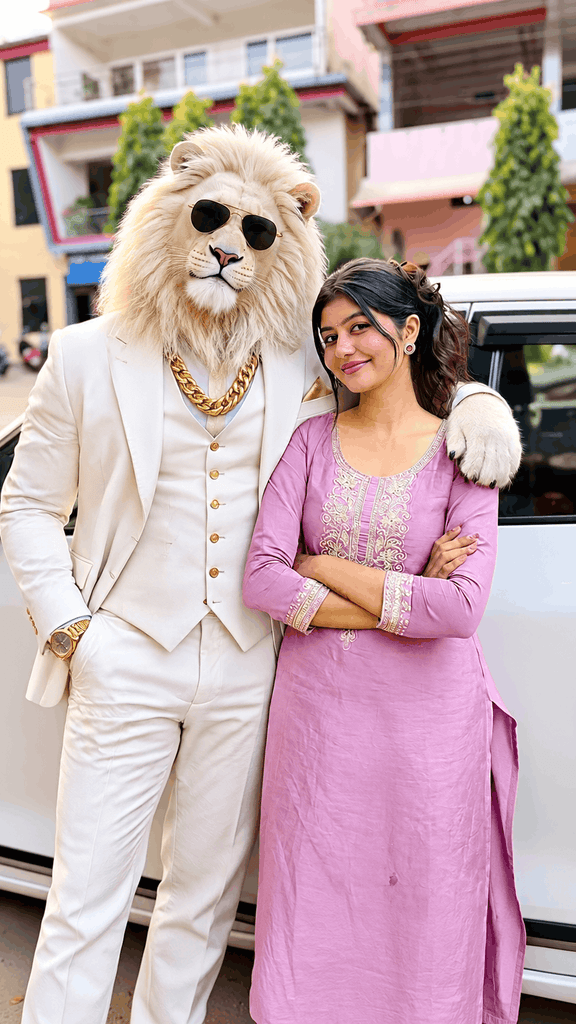
IMPORTANT: EDIT THE UPLOADED PHOTO, DO NOT GENERATE A NEW PHOTO.

Use my uploaded woman's photograph as the BASE IMAGE. This is an image-editing task, NOT a new image generation task.

STRICTLY PRESERVE THE ORIGINAL PHOTO:\
Keep the exact same woman, face, facial identity, hairstyle, skin tone, outfit, body shape, pose, position, background, location, architecture, lighting, camera angle, framing and composition. Do not recreate, replace, redesign or regenerate the original scene.

ADD ONLY ONE NEW CHARACTER – SHERU BHAI:

Place a majestic anthropomorphic white lion-headed humanoid character (Sheru Bhai) standing immediately BESIDE the woman on her LEFT SIDE, within the same photograph.

– Significantly taller than the woman.\
– Realistic white furry lion face with a thick cream-white mane.\
– Premium white formal three-piece suit.\
– White shirt.\
– Heavy golden chain around his neck.\
– Golden wristwatch.\
– Stylish black sunglasses.\
– Royal, friendly personality.\
– One furry arm naturally placed around the woman's shoulders, with his large paw resting gently on her shoulder.\
– His body must be visible naturally beside her, with realistic proportions.

REALISTIC INTEGRATION:

Make Sheru Bhai look like he was physically present when the original photograph was taken. Match the original photo's lighting direction, perspective, camera angle, shadows, sharpness, color temperature and depth of field.

ABSOLUTE RESTRICTIONS:

1. Do not create a different photograph.
2. Do not change the woman's original face or identity.
3. Do not change her clothes, pose or body position.
4. Do not change or replace the original background.
5. Do not remove or reposition the woman.
6. Do not create a separate image, collage or split-screen.
7. Do not add any other people or characters.

FINAL INSTRUCTION:\
Keep the uploaded photograph 100% intact and ADD ONLY SHERU BHAI standing beside the woman with his arm around her shoulder. The final result must look like one authentic, naturally captured photograph, not an AI-generated replacement.Lion Check: The lion must not look bigger than you. If the lion’s head covers your face, ask for the lion’s face beside yours, not in front of it.
Best For: DP, profile photo, WhatsApp DP and Instagram profile.
Prompt 5: Sheru Bhai With Royal Photo
A royal night photo. You in a black sherwani with Sheru Bhai at a palace entrance under golden lights. Best for a royal post and a festival night post.
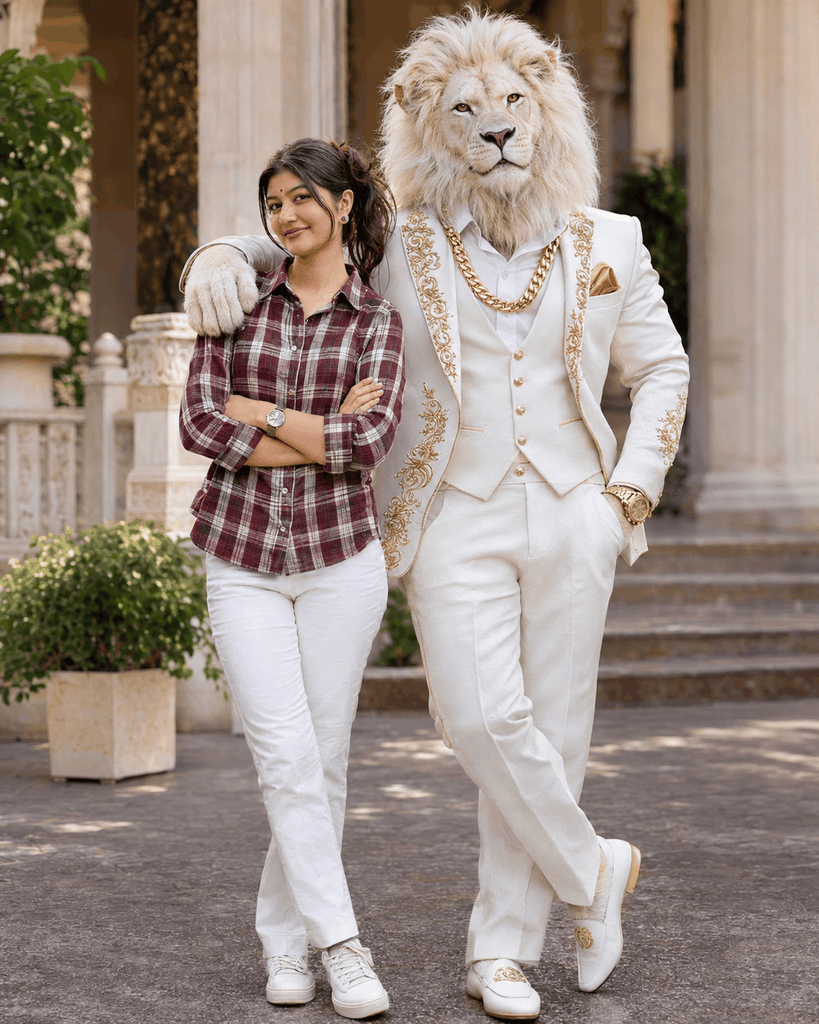
Use my uploaded photo as the PRIMARY and EXACT facial identity reference for the young Indian woman. Preserve her original face shape, skin tone, hairstyle, hairline, eyes, eyebrows, nose, lips, teeth, natural smile, and natural body proportions. Do not change, beautify, reshape, or replace her identity.

Create an ultra-realistic professional cinematic 4K/8K DSLR full-body portrait in vertical 4:5 ratio.

MAIN SUBJECT & POSE:
A stylish young Indian woman standing confidently beside a majestic anthropomorphic white lion. The lion stands on her left side, gently resting one large furry paw on her shoulder. Both face the camera directly with natural, confident expressions. Maintain realistic scale, natural posture, and anatomically accurate hands.

WOMAN'S OUTFIT:
– Elegant maroon, white, and black checked full-sleeve shirt.
– Stylish white slim-fit trousers.
– Premium silver wristwatch.
– Small elegant golden ear studs.
– Preserve her original hairstyle exactly as shown in the uploaded photo, including natural length, texture, and hairline.
– Small red round tilak on her forehead.
– Neck completely bare, without any necklace, chain, choker, or pendant.
– Natural minimal makeup without altering her original facial features.

WHITE LION:
– Majestic photorealistic white lion with a thick cream-white mane.
– Premium tailored white royal suit with intricate golden embroidery.
– Heavy golden chain around the lion's neck.
– Golden wristwatch and elegant golden pocket square.
– One furry paw resting gently and naturally on the woman's shoulder.
– Highly detailed fur, realistic eyes, natural shadows, and regal appearance.

BACKGROUND:
Luxurious outdoor palace entrance with cream-colored marble pillars, elegant architecture, soft green plants, warm daylight, and beautiful cinematic background blur.

PHOTOGRAPHY:
Professional DSLR photography, 85mm portrait lens, f/1.8 aperture, natural skin texture, sharp facial details, realistic lighting, soft shadows, cinematic color grading, premium Instagram portrait quality, ultra-detailed 8K aesthetic.

STRICT FACE IDENTITY LOCK:
Use the uploaded woman's photograph as the exclusive facial identity reference. Preserve her original facial proportions, skin tone, eyes, nose, lips, smile, and hairstyle. Do not replace her with a generic AI-generated model. No face reshaping, no excessive skin smoothing, no artificial beautification.

NEGATIVE PROMPT:
Different face, altered identity, changed hairstyle, artificial skin, distorted hands, extra fingers, incorrect anatomy, unrealistic lion paws, necklace on woman, blurry face, cartoon style, text, logos, watermarks.

FINAL OUTPUT:
Ultra-realistic cinematic full-body portrait of the same woman standing beside a royal white lion, vertical 4:5 aspect ratio.Lion Check: The golden light must fall on the lion’s mane and your face, not only on the palace. If your face is dark, ask for more golden light on the face.
Best For: Royal post, festival night post, reel cover and a grand DP.
Create in Gemini
How to Use This Prompt?
Step 1 Copy the Prompt: Pick the prompt that matches your photo and copy the full text.
Step 2 Open Gemini: Open the Gemini app or website and start a new chat.
Step 3 Add Your Photo: Upload the photo you want to edit. Use a clear front photo with good light.
Step 4 Generate the Image: Paste the identity line first, then the prompt, and generate.
Step 5 Wait for the Result: Gemini takes a few seconds. Download the result you like best.
If the first result is wrong, change only one thing at a time. Change the lion line, or the outfit line, or the background line. Never change all three together. One change per try tells you what fixed it.
Also Read: 7 Stunning Bhai Dooj AI Photo Editing Prompts for Gemini 2026
Which Photo Should You Upload?
Use a clear photo taken in daylight, with your face looking at the camera. Avoid group photos, sunglasses, heavy filters and blurry selfies. A simple front photo gives the best result, because Gemini has a clear face to keep. For a full-body prompt like the palace photo, upload a photo where your full body is visible. For the couple prompt, upload two clear photos, one of each person.
Sheru Bhai Photo Guide: Lion, Light and Face
- The Lion: Sheru Bhai is a white lion in a white royal suit with a golden chain. Write the lion in full detail in every prompt: white suit, golden chain, golden watch, pocket square. A short line like “white lion” gives a random lion, but a full line gives Sheru Bhai.
- The Paw: The paw on your shoulder is the photo’s main point. Write “one large furry paw resting gently and naturally on the shoulder” in the prompt. If you write only “paw on shoulder”, the paw can look stiff or too big.
- The Face: Your face is the photo, so paste the identity line first, before the prompt. A clear front photo in daylight gives the best face. A side-face photo or a photo with sunglasses gives a wrong face.
- The Ratio: These prompts are made for vertical 4:5, which fits Instagram posts and reels covers. Do not change the ratio to 9:16 in the prompt, or the lion and the palace will get cropped.
Problems and Their Solutions
1. The face changes in the result.
Keep my exact face from the uploaded photo. Do not beautify, slim or change my face, smile or skin tone.2. The lion looks like a statue or a toy.
Keep the lion photorealistic with detailed fur, realistic eyes and natural shadows. No statue look, no cartoon look, no toy look.3. The paw looks stiff or too big.
Keep one large furry paw resting gently and naturally on my shoulder. The paw must be the same size as a real lion paw, not bigger than my shoulder.4. A necklace appears on the neck.
Keep my neck completely bare. No necklace, no chain, no choker, no pendant on my neck.5. Text or a watermark appears in the photo.
Sheru Bhai AI Photo Editing Prompts for Gemini Details
| Detail | Information |
|---|---|
| Topic | Sheru Bhai AI photo editing prompts |
| Tool | Gemini |
| Prompts in this post | 5 |
| Photo type | Your own uploaded photo |
| Image size | Vertical 4:5 |
| Best for | Instagram post, reel cover, DP, WhatsApp status |
| Face | Kept same as your photo |
| Lion | White lion, white royal suit, golden chain |
| Lens | 85mm f/1.8 |
| Price | Depends on your Gemini plan, not confirmed here |
Final Words
Sheru Bhai is not a normal lion photo. It is a royal photo, and the royal part is the lion, the suit and the palace, all in one frame. Pick the prompt that matches your photo, keep your face locked with the identity line, and generate it today. One prompt, one clear photo and one good result are enough.
FAQs
What is a Sheru Bhai prompt?
A Sheru Bhai prompt is a Gemini prompt that puts your photo next to Sheru Bhai, the royal white lion in a white suit and golden chain, at a palace entrance. You upload your own photo and Gemini keeps your face the same.
Which is the best Sheru Bhai prompt for Gemini?
Prompt 1, the man standing with Sheru Bhai, is the safest first try. It has one person, one lion and one palace, so Gemini has the least to get wrong.
Can I use a Sheru Bhai prompt for a DP?
Yes. Prompt 4, the Sheru Bhai DP close-up, is made for a DP. It keeps your face and the lion’s face in one tight frame.
Will Gemini keep my exact face with Sheru Bhai?
Gemini keeps your face close to your uploaded photo when you paste the identity line first. The result can still vary a little with your photo and the tool, so check the face before you share it.
Can I make a Sheru Bhai photo with my partner?
Yes. Prompt 3 is made for a couple. Upload two clear photos, one of each person, and Sheru Bhai stands between you with one paw on each shoulder.